Not connected to SAP
They answer from documents, email and the web. Open invoices, orders and stock stay out of reach, so questions about SAP get guesses.
Sovereign AI for SAP ECC and S/4HANA
An assistant that feels like ChatGPT or Microsoft Copilot, connected to hundreds of SAP tools, and business AI apps that run without generative AI. One shell, on your infrastructure, with your models.
Most companies already pay for AI assistants, yet their SAP work has hardly changed. Writing emails is one thing. SAP work runs on live business data, strict authorizations and documents that must be posted correctly, and that is where general-purpose AI tools stall.
Six reasons we see across customers:
They answer from documents, email and the web. Open invoices, orders and stock stay out of reach, so questions about SAP get guesses.
Where a connector exists, it reads a few objects. Posting, releasing or reversing a document still happens in SAP GUI.
Prompts and SAP data travel to a cloud model outside your control, which rules out many finance and HR processes.
Connectors often run under one technical user, outside the role concept your auditors rely on.
Every use case needs its own integration project, so few of them ever reach production.
Per-user and per-token pricing rises with each new use case and each new user.
Today
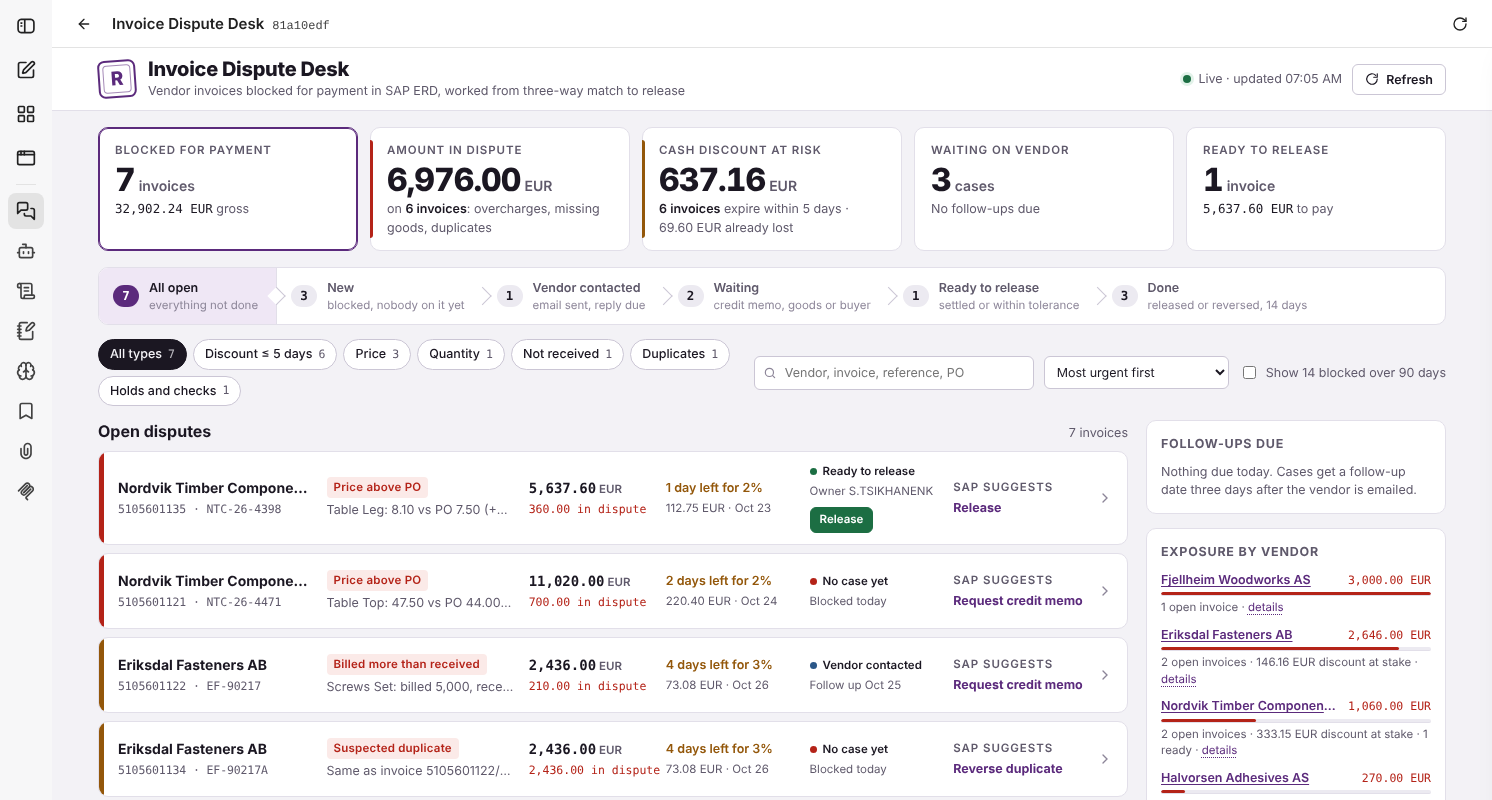
A buyer asks the company's AI assistant why an invoice is blocked. It cannot see SAP, so she checks MRBR, MIR4, ME23N and MB51 herself.
With Skybuffer AI
The assistant reads the invoice, the order and the goods receipts in SAP and explains the block. The desk next to the chat releases it.
The platform
Instead of teaching a general assistant about SAP, Skybuffer AI puts governed SAP tools into the ABAP stack and gives users one place to use them. It runs where your SAP runs: on premise, in a private cloud or air-gapped.
Your infrastructure · on premise, private cloud or air-gapped
Skybuffer AI shell
SAP ECC or SAP S/4HANA
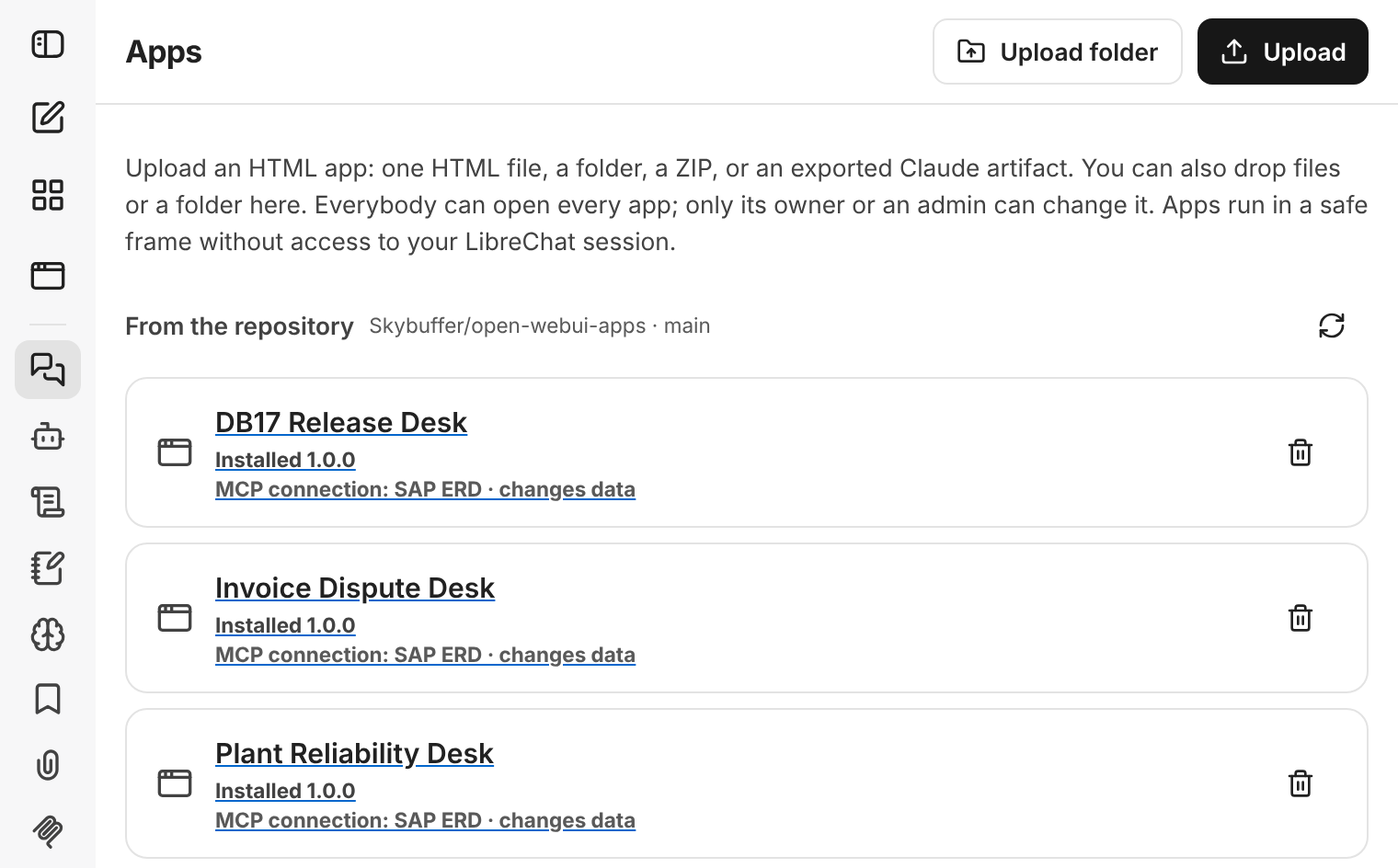
Installed from Git. The Apps page lists every app in your company repository, versioned and reviewed.
Declared SAP access. Each app names its MCP connection and whether it changes data.
A safe frame. Apps run without access to the user's chat session.
One integration layer to secure: chat and apps use the same MCP tools, under the same SAP authorizations.
Conversational experience
Users ask in plain language, as they would in ChatGPT or Microsoft Copilot. The assistant picks the right tools in SAP ECC or SAP S/4HANA and answers from live data, on your models.
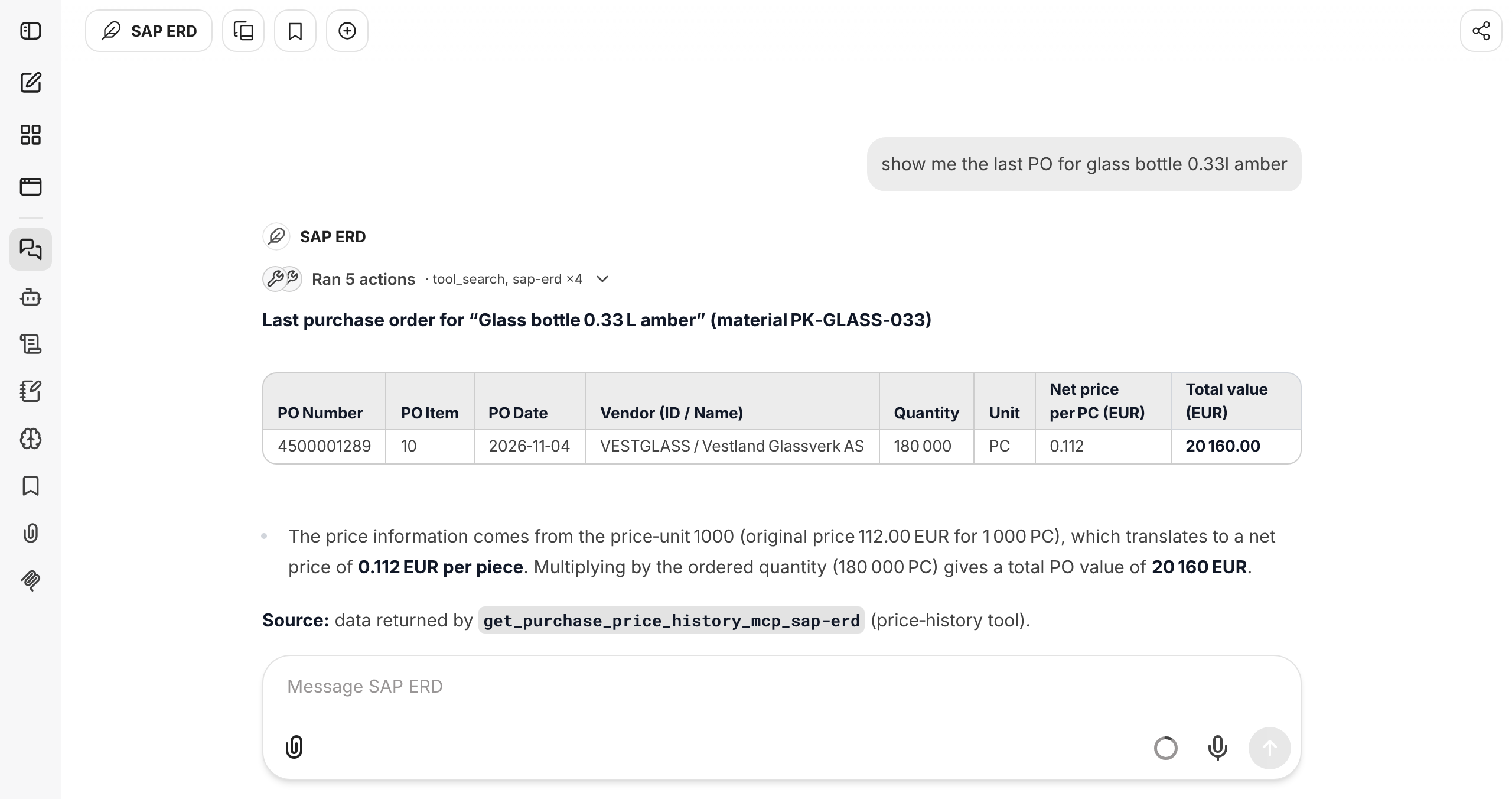
A question or a task, in the user's own words.
From hundreds of tools, tool search picks the right ones.
Under the user's own SAP user and authorizations.
Live figures and tables, with the tool named as the source.
Hundreds of tools
Missing a tool? The agent builds it in development, in hours.
Your model, your choice
Local LLMs. Prompts and SAP data stay in your network.
A trusted model hub. Models from a hub you approve.
Free to switch. Tools, apps and authorizations stay the same.
Business AI apps
Generated by AI for your processes, they run without it. In the same shell as the chat, the apps display, create and update SAP data.
Faster than SAP Fiori or SAP GUI. The Invoice Dispute Desk replaces MRBR, MIR4, ME23N, MB51 and MR8M with one screen, and every action runs in place.
Generated for your processes. Claude builds each app from your own process description, with your fields, rules and wording.
No model at run time. Apps call SAP tools directly: no prompts, no tokens and the same result every time.
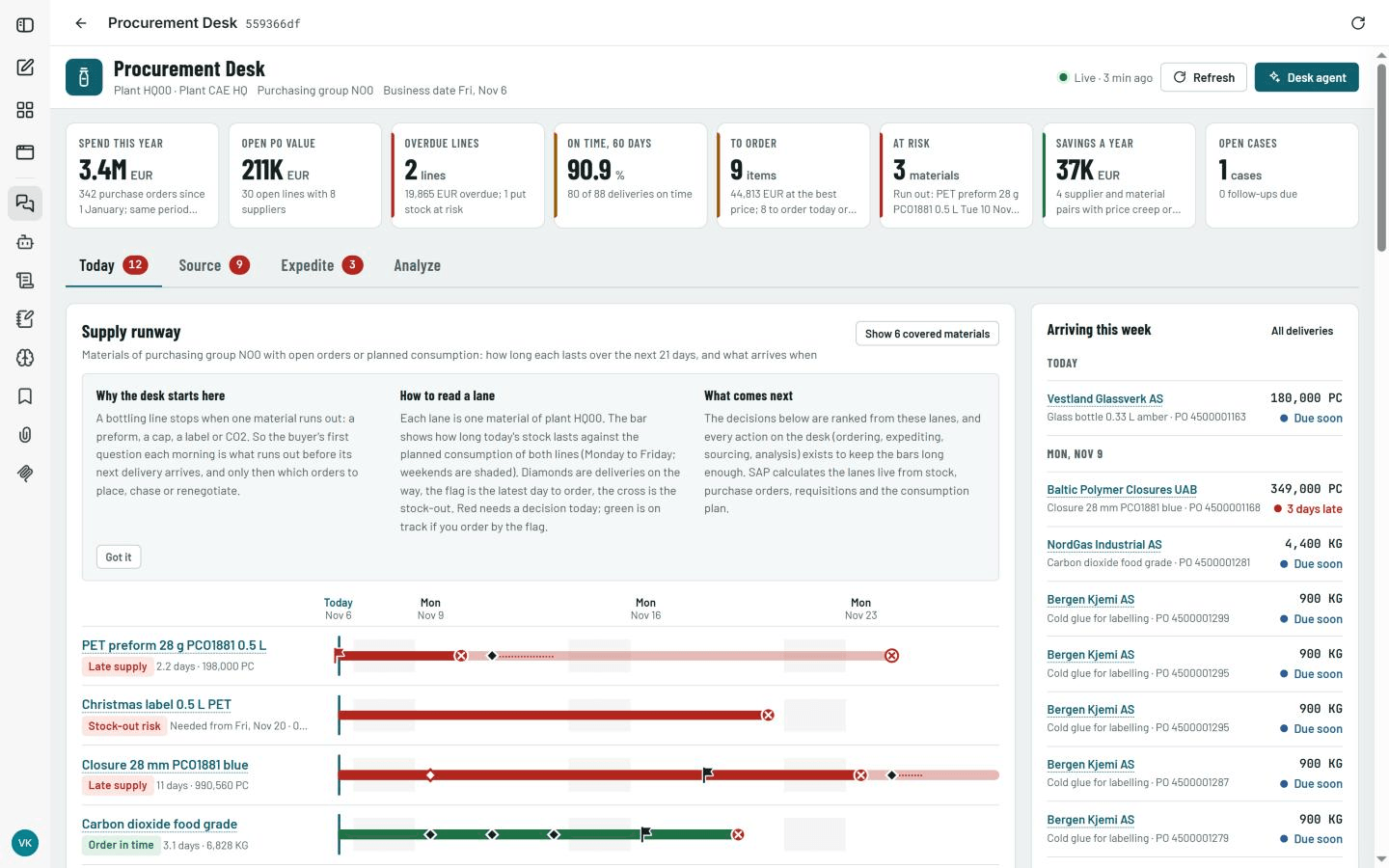
Generated by AI, run without it
Generative AI is at its best when a question is open. A business process is not: its steps, checks and rules are known. So Claude writes the app once, in development, and from then on the app calls SAP tools directly, like any well-built application.
The same input gives the same result, so auditors can test it like any SAP program.
No waiting for a model: screens load straight from SAP and actions post in place.
No tokens and no GPU load, however many users work in the apps.
Built the same way
From development to production
Build with Claude on test data, deliver through transports and Git, and run with no cloud service in the path. Production does not depend on Claude.
Sandbox or development system
DEV › QAS › PRD
Your infrastructure, sovereign
Designs with the business
Business users and SAP architects describe the process; Claude turns it into screens, rules and tools.
Builds both layers
The ABAP MCP tools, the app on top of them and the test data, in one dialogue.
Repairs and improves
Reads ABAP dumps and traces, simulates the fix and implements it in development.
Sovereignty and security
Sovereignty is not a setting you switch on. It is where the platform runs, whose models answer and whose authorizations apply.
With a local LLM, prompts, answers and SAP data never leave your infrastructure.
Local LLMs or a trusted model hub you approve, replaceable without touching tools or apps.
The shell reaches SAP through SAP's own OAuth 2.0 server. No SAP BTP MCP Gateway is needed.
Users sign in with their own SAP user, and every tool runs under it. No technical users.
MCP tools are ABAP in your SAP system; apps are files in your Git repository.
The platform runs without internet access when the LLM is local.
| Topic | General-purpose AI tools | Skybuffer AI |
|---|---|---|
| Reach into SAP | Documents and web; add-on connectors to SAP | Hundreds of SAP tools in ABAP |
| Acting in SAP | Mostly read-only | Posts, releases, reverses and changes documents |
| Where data goes | The vendor's cloud | Your infrastructure, or a model hub you approve |
| Models | The vendor's choice | Local LLMs or a trusted model hub you approve |
| Sign-in to SAP | Often a shared technical user | Each user's own SAP user |
| Business apps | Not included | Generated for your processes, no generative AI at run time |
| Daily SAP work | Users switch back to SAP GUI or SAP Fiori | One screen per process, faster than SAP GUI |
General-purpose AI tools as a category, not any specific product; capabilities differ by product and configuration.
Skybuffer AI in production
Examples from production deployments, not promises; absolute amounts scale with company size.
The Skybuffer AI add-on in your sandbox or development system.
Pick one process and build the first app with Claude and your team.
The Skybuffer AI shell and your model on your infrastructure.
Transport, commit to Git and open the app in the shell.
Plan your first workshop with us. We build the first app with your team, in your own development system.
Claude and Claude Desktop are products of Anthropic. ChatGPT is a trademark of OpenAI and Microsoft Copilot a trademark of Microsoft Corporation; both are named only to describe the user experience. SAP, SAP ECC, SAP S/4HANA, SAP Fiori, SAP GUI and SAP BTP are trademarks of SAP SE.